Getting Started#
Simple interaction analysis between oseltamivir and neuraminidase#
Since 2005, there have been many bird flu outbreaks (see Figure 1). Bird flu is caused by the influenza virus A, which can evolve at an alarming rate due to its nature as an RNA virus. RNA viruses are known to mutate faster than DNA viruses. Additionally, this virus can reassort its genetic material when multiple virus strains infect the same host.
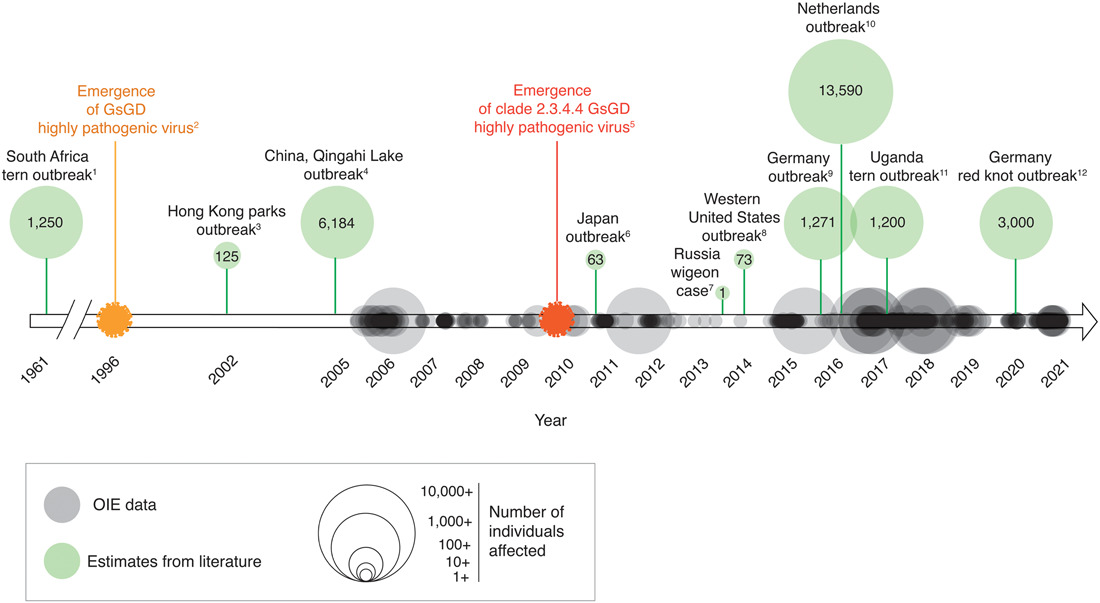
Figure 1. Timeline depicting occurrence and magnitude of outbreaks of highly pathogenic avian influenza (HPAI) in wild and captive birds (i.e., non-poultry)
The rapid evolution of influenza raises concerns about its resistance to antiviral agents. One crucial protein in its replication is neuraminidase, and it is the primary target of influenza drugs. However, some strains have become less susceptible to oseltamivir, the most widely used neuraminidase inhibitor.
In this walkthrough, we will focus on the interaction analysis between oseltamivir and neuraminidase. We will use Deemian to quickly identify the amino acid residues interacting with oseltamivir by writing a simple script and running it. Then, we will refine the script until we obtain the desired result.
Writing and running simple script#
First lets get the PDB file from RCSB using the ID: 5nzn.
Then, using text editor of your choice write and save this code into n1-oseltamivir-5nzn.txt:
n1-oseltamivir-5nzn.txt
molecule 5nzn.pdb [
    select protein_A = chain A and protein
    select oseltamivir = chain A and resname G39
]

measure protein_ligand [
    interactions all
    between oseltamivir and protein_A
]

present protein_ligand [
    interactions n1_g39_5nzn.txt
    deemiandata n1_g39_5nzn.dd
]
Quick note
Deemian script is divided into steps, with each step consisting of a step name (
molecule,measure, orpresent), an identifier (such as5nzn.pdbandprotein_ligand), and instructions (everything between square brackets).Each step has at least one instruction, and every instruction operates within the context of the step.
The molecule step deals with reading file molecule, selecting parts of the molecule, and preparing the molecule.
The measure step deals with configuring the interaction.
The present step deals with formatting and generating results.
The spaces before each instruction are optional but recommended to make the script more readable. As a rule of thumb, use four spaces before each instruction.
In the Deemian script provided above, there are three steps.
In the first step, we load the file 5nzn.pdb and create two selections upon the whole structure of 5nzn.pdb.
The first selection is protein_A which is self-explanatory and the next selection is oseltamivir which is assigned with chain A and resname G39.
The keyword resname indicates the residue name, so resname G39 is the selection phrase for residue name G39, which is the residue identifier for oseltamivir as stated in the RCSB page for 5nzn.
We would like to focus our interaction analysis on chain A, hence we use chain A phrase in both selections.
Warning
Like any other programming language, Deemian is case-sensitive.
Every keyword should be lowercase.
For example, you should always use chain and never Chain.
Additionally, the chain name and residue name must be in the same case with as their PDB file counterpart.
The convention is to use upper case for chain names (A, B, C) and residue names (G39, ALA, HIS).
In the second step, we set the measurement to analyze all interaction types with interactions all instruction.
We also set up the interacting subjects using the between and and command. Notice that we use the previously assigned selection as the first and second interacting subjects.
Lastly, in the third step, we decide to get the results in both the readable format and Deemian data format.
We also set the output file name for both formats.
Make sure that the identifier name for present step match with the corresponding measure step it tries to present.
Next, ensure that 5nzn.pdb and n1-oseltamivir-5nzn.txt are in the same folder.
Then run Deemian using the command deemian run n1-oseltamivir-5nzn.txt you should get output similar to this:

Now we have two result files, n1_g39_5nzn.txt and n1_g39_5_nzn.dd.
The first file is the readable output and the second file is the Deemian data file, which can be opened with Deemian Viewer.
For now, let’s try to open the first one:
n1_g39_5nzn.txt
Deemian version: 0.0.0.post73+42d4889

interaction for "oseltamivir:protein_A":
    No interaction detected
Interesting… No interaction detected? What is going on here?
Do not worry. This is the expected behavior of Deemian, which assumes that every part of the molecule is in a neutral state and no electrostatic interaction is detected when it tries to open a PDB file with no hydrogen or connectivity data. To deal with this, we will need to tweak our analysis a little bit in the next section.
Set up the ionizable group as charged group#
Usually, in biomolecules, charged moieties exist because of base protonation or acid deprotonation. Some exceptions are metal ions or halide ions which are innately charged. Thus, to identify electrostatic interaction, the molecule must be properly protonated. Unfortunately, protonation is a tricky subject, and even to this day, there is still ongoing research on molecule protonation methods. Plus, the protonation state may constantly change.
The good news, there is an alternative method to identify the charge. That is, by scanning a molecule based on its ionizability. For example, even though the carboxylic moiety of aspartic and glutamic acid is neutral in the molecular data representation, we know that it has the potential to be deprotonated and become negatively charged. Thus, we can call this moiety an ionizable group.
Deemian can identify the ionizable groups and regard them as positively or negatively charged groups. To do so let’s add two line of code as shown here:
n1-oseltamivir-5nzn-ionizable.txt
molecule 5nzn.pdb [
    select protein_A = chain A and protein
    select oseltamivir = chain A and resname G39
]

measure protein_ligand [
    ionizable positive true
    ionizable negative true
    interactions all
    between oseltamivir and protein_A
]

present protein_ligand [
    interactions n1_g39_5nzn_ionizable.txt
    deemiandata n1_g39_5nzn_ionizable.dd
]
After we run the script above we get the following results:
Deemian version: 0.0.0.post73+42d4889

interaction for "oseltamivir:protein_A":
conf          1
    ELECTROSTATIC as_cation:

                         oseltamivir protein_A

    id                   12078       281     282     529
    atom_name            N4          OE1     OE2     OD1
    res_name             G39         GLU     GLU     ASP
    res_num.chain        503.A       119.A   119.A   151.A
    distance                         4.206   2.744   3.157

Figure 2. The n1_g39_5nzn_ionizable.dd visualized with Deemian Viewer.
Now it appears that the primary nitrogen in oseltamivir molecule identified as positively charged group and it interacts with two carboxylic moieties nearby (see Figure 2 in Deemian data visualization tab above). But something is missing here. If we do comparative study with other interaction analysis tool, such as PoseView (see Figure 3), there suppose to be other electrostatic interactions formed by the carboxylic moiety of oseltamivir with three arginine residue nearby.

Figure 3. The interaction analysis result between oseltamivir and neuraminidase generated with PoseView.
Yet those interactions can not be identified here. That is because the underlying cheminformatics engine used by Deemian was misrepresenting the carboxylic acid as dihydroxymethyl, which is apparent in Deemian data visualization in Figure 2 above. We can see in the Deemian data visualization that the oseltamivir molecule has no double bond while in fact it has three double bond. This is a common problem that happen when cheminformatics tool read PDB file, which usually contain no hydrogen and no connectivity data. Thus, the tool will try to determine the bond order and assume the number and location of hydrogen atoms based on atom-atom distance and three atom angle.
In the next step we will further improve our script by adding bond assignment instruction.
Correct bonds with molecule template#
Bond assignment on oseltamivir require a template molecule which we need to provide in the form of SMILES structure.
To obtain the SMILES structure we have to go to Small Molecules section of RCSB PDB page for PDB ID: 5nzn (see Figure 4).

Figure 4. Small Molecules section of RCSB PDB page for PDB ID: 5nzn.
Using the SMILES structure of oseltamivir we can construct additional instruction to Deemian:
n1-oseltamivir-5nzn-ionizable-corrected.txt
molecule 5nzn.pdb [
    select protein_A = chain A and protein
    select oseltamivir = chain A and resname G39
    assign bond oseltamivir template CCC(CC)O[C@@H]1C=C(C[C@@H]([C@H]1NC(=O)C)N)C(=O)O
]

measure protein_ligand [
    ionizable positive true
    ionizable negative true
    interactions all
    between oseltamivir and protein_A
]

present protein_ligand [
    interactions n1_g39_5nzn_ionizable_corrected.txt
    deemiandata n1_g39_5nzn_ionizable_corrected.dd
]
Running the script above will generate the following results:
Deemian version: 0.0.0.post73+42d4889

interaction for "oseltamivir:protein_A":
conf          1
    ELECTROSTATIC as_cation:

                         oseltamivir protein_A

    id                   19          281     282     529
    atom_name            N4          OE1     OE2     OD1
    res_name             G39         GLU     GLU     ASP
    res_num.chain        503.A       119.A   119.A   151.A
    distance                         4.206   2.744   3.157

    ELECTROSTATIC as_anion:

                         oseltamivir protein_A

    id                   1           271     272     273     2202    2203    2204
    atom_name            O1A         CZ      NH1     NH2     CZ      NH1     NH2
    res_name             G39         ARG     ARG     ARG     ARG     ARG     ARG
    res_num.chain        503.A       118.A   118.A   118.A   368.A   368.A   368.A
    distance                         3.646   2.800   3.584   3.625   2.832   3.523

    id                   2           1624    1625    1626    2202    2203    2204
    atom_name            O1B         CZ      NH1     NH2     CZ      NH1     NH2
    res_name             G39         ARG     ARG     ARG     ARG     ARG     ARG
    res_num.chain        503.A       293.A   293.A   293.A   368.A   368.A   368.A
    distance                         3.547   3.181   3.015   3.702   3.677   2.833

Figure 5. The n1_g39_5nzn_ionizable_corrected.dd visualized with Deemian Viewer.
Finally, our interaction analysis works as expected. Now we can see that there are two kinds of electrostatic interaction. The first one is where the oseltamivir acts as a positive charge carrier and the second one is where oseltamivir acts as the negative charge carrier. The positively charged group of oseltamivir can interact with nearby aspartic and glutamic acid residues, whereas the negatively charged group of oseltamivir can interact with nearby arginine residues.
Also, notice that the oseltamivir in the result visualization now has three double bonds which indicates that the bond assignment instruction works as expected (See Figure 5).
What Next?#
Congratulation! Now that you know the basic usage of Deemian, I suggest that you continue the lesson by learning how to visualize Deemian using Deemian Viewer, exploring related PDB structures (5NWE, 5NZ4, 5NZE, and 5NZF), or you can continue learning the tutorial series.